支援音訊的 AI 圖像生成影片工具
在 bestimage.ai 上將相片和參考圖像製作成 AI 短片。從免費點數開始,上傳圖像、描述動態、選擇支援的圖像生成影片模型,然後為產品、人像、社群貼文、廣告和創意概念生成流暢短片。
AI 圖像生成影片工具範例
AI 圖像生成影片工具範例展示了來源圖像如何變成動態短片,呈現提示詞引導的動作、鏡頭移動和視覺一致性,並在所選模型支援時加入可選音訊。
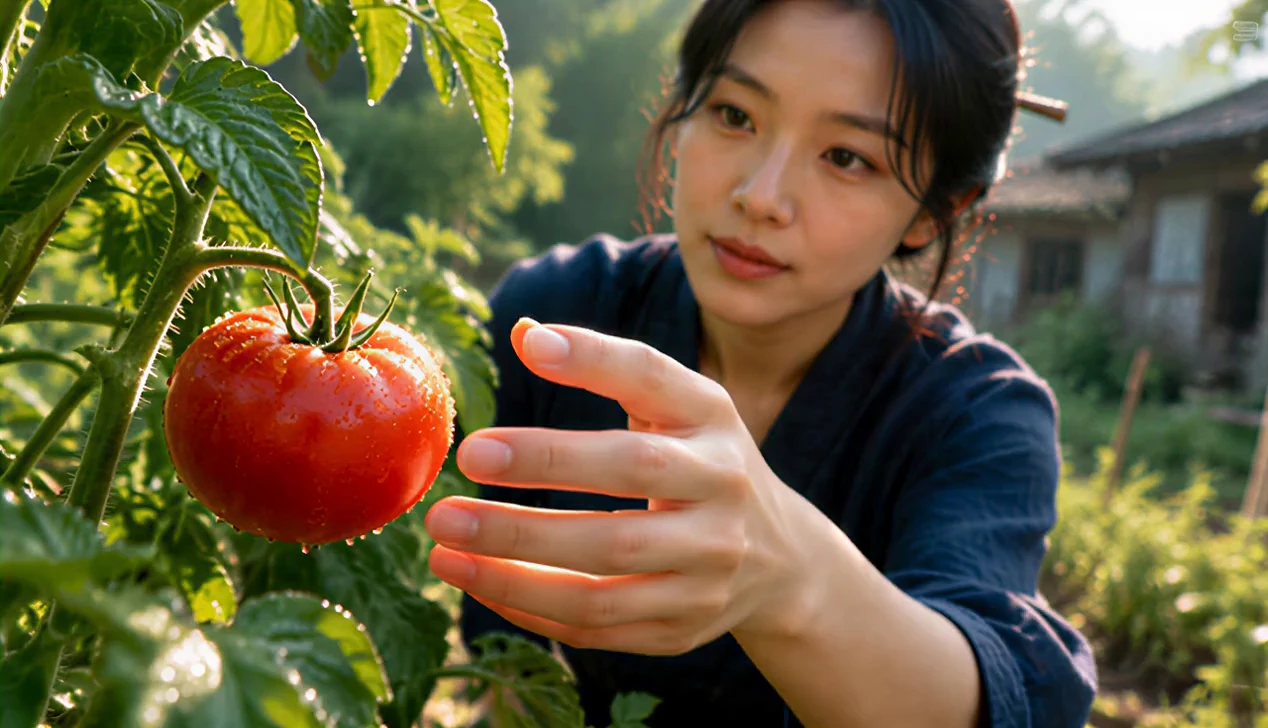
[Style] Modern Rural Aesthetics, Cinematic Commercial quality, shot with Sony A7S3/cinema camera, 4K/8K ultra-clear, Extreme Macro, natural transparent lighting, healing ASMR, no historical costume drama feel. [Scene] A well-maintained modern farmhouse open kitchen, background is a lush vegetable garden, bright sunshine. [Character] Modern Rural Creator, black long hair casually tied up with a wooden hairpin, wearing a dark blue comfortable linen outfit, clear makeup, focused and peaceful eyes. [Shot Details] [00:00-00:05] Shot 1: Morning Harvest (The Freshness) Visuals: High-definition close-up. Morning sunlight hits the plants with side backlighting. Action: The Creator's bare hands (long, clean fingers) pick a bright red tomato with glistening dew drops from the vine. Details: Extremely sharp focus, clearly showing the fuzz on the tomato surface and the trajectory of sliding water droplets. Background is blurred high-quality green. [00:05-00:10] Shot 2: Extreme Craftsmanship (The Craft) Visuals: Indoor stove area, full of life but spotless. Action: The Creator is cutting vegetables, movements are skilled and precise (non-performance nature). Details: Macro lens captures the moment the knife blade slices through the ingredients, juice splattering. Then switches to the orange flame flickering in the earthen stove, light and shadow are warm and real. [00:10-00:15] Shot 3: Tranquil Time (The Moment) Visuals: Full shot/Medium shot. Action: A delicate home-cooked dish is placed on the wooden long table in the yard. The Creator sits down quietly, gently tidies a stray hair, and picks up a bite of food. Atmosphere: Steam slowly rises against the backlight, the scene is so quiet you can almost hear the wind, showcasing the ultimate sense of relaxation modern people yearn for.
圖像生成影片工具功能
在同一線上影片工作流程中,結合上傳的圖像與提示詞引導的動態、多模型動畫、可選結束影格控制、彈性的影片設定和透明的點數費用估算。
參考圖像引導動畫
上傳產品相片、人像、角色圖像、設計視覺稿或場景參考圖,讓 AI 模型在生成動態畫面的同時保留關鍵細節。
提示詞引導的動態控制
描述哪些內容應該移動、鏡頭應該如何運作、需要營造怎樣的氛圍,以及來源圖像的哪些細節應該保持穩定。
多模型圖像生成影片創作
選擇支援的圖像生成影片模型,比較不同供應商的動態風格、真實感、速度、品質、音訊支援和定價。
彈性的影格和影片設定
根據所選模型調整時長、寬高比、解析度、聲音、結束影格、種子、鏡頭鎖定和負面提示詞等支援的選項。
圖像生成影片使用情境
當需要以現有圖像作為影片基準時,可使用 bestimage.ai 圖像生成影片工具,無論你想製作產品動態、人像動畫、行銷活動內容還是快速視覺概念。
產品和電商影片
將產品相片、包裝圖像、模型和電商視覺素材轉化為短片,用於廣告、登陸頁、社群貼文和新品發表活動。
人像和角色動畫
將人像、頭像、角色藝術、時尚圖像和生活風格相片製作成動畫,同時保留來源圖像的重要外觀特徵。
社群媒體影片創作
根據靜態圖像建立適合動態消息的短片,用於 TikTok、YouTube Shorts、Instagram Reels、縮圖、限時動態和付費社群媒體測試。
設計和概念預覽
將概念藝術、海報、故事板、情緒板和視覺探索轉化為動態預覽,用於審核、提案簡報和創意迭代。
如何根據圖像生成影片
上傳參考圖像,撰寫動態提示詞,選擇模型,然後生成並最佳化由圖像引導的 AI 影片。
上傳參考圖像
首先上傳想要製作成動畫的相片、產品圖像、人像、設計或視覺參考圖。部分模型還支援結束影格。
描述動態
撰寫提示詞,說明動作、鏡頭移動、情緒、光線、節奏、背景變化,以及應保持穩定的來源圖像細節。
生成、預覽和最佳化
選擇支援的圖像生成影片模型,生成短片並預覽結果,然後最佳化提示詞或設定以獲得更好的版本。
探索更多媒體創作 AI 模型
在 bestimage.ai 上探索更多圖像、影片和聊天模型;模型頁面包含功能、定價詳情、API 範例和試用入口。
 seedance-v2.5-text-to-videotext-to-video
 gemini-omni-1.1-flash-reference-to-videoreference-to-videoveo3.1-fast-text-to-videotext-to-videoseedance-v2.0-reference-to-videoreference-to-video
 minimax-h3-reference-to-videoreference-to-video
 wan-2.6-text-to-videotext-to-videoseedance-v2.0-image-to-videoimage-to-videogemini-omni-1.1-flash-video-editvideo-edit