Seedance 2.5 Prompts
Explore structured Seedance 2.5 video prompts for cinematic scenes, advertising, animation, UGC, and controlled image-to-video workflows.
Start with practical image and video prompt examples, open a complete prompt collection, or browse its maintained GitHub library.
Explore structured Seedance 2.5 video prompts for cinematic scenes, advertising, animation, UGC, and controlled image-to-video workflows.
Browse production-oriented MiniMax H3 prompts for brand films, product videos, social campaigns, storytelling, and audiovisual creation.
Discover Wan 3.0 prompt ideas for cinematic storytelling, transitions, product videos, action, animation, and professional video direction.
Find detailed Qwen Image 3.0 prompts for posters, product visuals, social content, editorial design, typography, and image production.
Explore image prompts for product visuals, editorial design, portraits, typography, and controlled reference-based editing.
Explore several AI creation tools for quick image and video workflows in your browser, then scale successful ideas with Best Image AI's production-ready model APIs. Best Image AI provides a unified API layer for all models, making it easy to use and scale your workflows.

Create AI images from text prompts

Create AI images from images and text prompts

Create AI videos from text prompts

Animate images into AI videos

Create AI images and videos in one unified workspace

Create consistent videos from reference media

Build visual AI image and video workflows on an infinite canvas
Create for free · Earn as an affiliate
Join the Bestimage.ai affiliate program, share your referral link with creators who need reliable AI tools, and earn commissions through your referrals.
Join the Affiliate ProgramFree Online Image UpScaler is a browser-based AI tool that allows you to improve image resolution and quality without any server interaction. Effortlessly upscale your images by 2x or 4x while preserving exceptional quality. All processing occurs locally in your browser—completely free, ensuring your privacy and security.
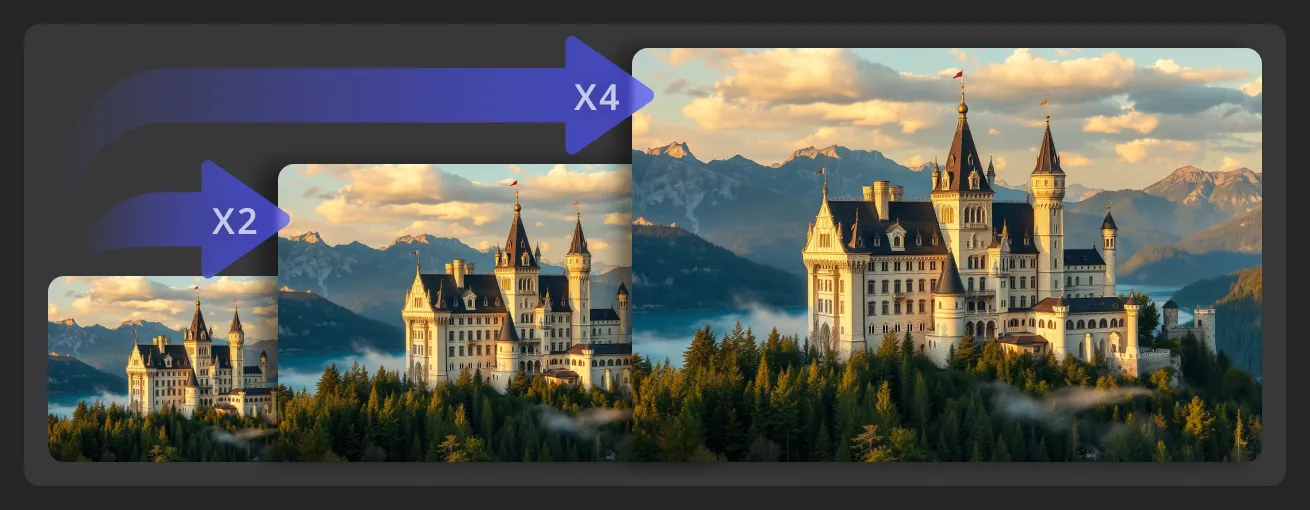
Increase image size with a private browser-based workflow designed for quick 2x and 4x upscaling.
Upscale images locally in your browser without sending the original files to a remote server.
Choose between two enlargement options to create an output size that fits your project.
Increase image dimensions through a simple browser workflow and preview the result within seconds.
Download the upscaled result directly after processing and continue using it in your creative workflow.
Four simple steps to obtain enhanced images using the Free Online Image UpScaler.
Choose a JPG, PNG, or WebP image from your device to begin upscaling it directly in your browser.
Select the 2x or 4x option based on the output size you need.
Start the enhancement and let your browser process the image locally without uploading it to a server.
Preview the upscaled result and download the enhanced image to your device.
Explore representative AI image and video models for production-ready creative workflows, with model pages, API access, pricing details, and discounts through Best Image AI's unified model platform.
 seedream-v4.5-editimage-to-image
 gemini-omni-1.1-flash-video-editvideo-edit
 gpt-image-2-editimage-to-imageseedance-v2.5-reference-to-videoreference-to-video
 minimax-h3-reference-to-videoreference-to-videoseedance-v2.0-fast-text-to-videotext-to-videogemini-omni-1.1-flash-text-to-videotext-to-videogemini-omni-1.1-flash-image-to-videoimage-to-video